Core Puzzle Mechanics
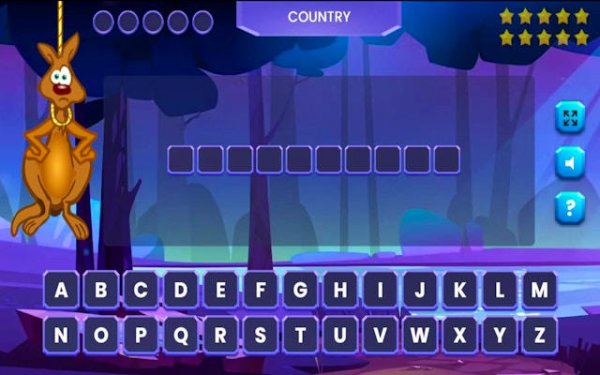
Word Quest with Kanga centers on a straightforward letter-guessing format. Each puzzle presents a hidden word or phrase, with blank spaces indicating the number of letters. Players select letters from an on-screen keyboard; correct choices reveal the letter in its proper position, while incorrect ones do not penalize progress but prompt a lighthearted comment from Kanga. The absence of a timer allows players to think carefully, making it suitable for both quick sessions and extended play.
Themed Category System
Puzzles are organized into diverse categories that rotate randomly, ensuring variety across rounds. Categories include Olympic Sports, Cartoon Characters, Animals & Plants, Documentaries, and Song Titles. This structure exposes players to a broad range of vocabulary and general knowledge, from specific athletic terms to names of popular media. Each category feels distinct, encouraging players to draw on different areas of knowledge as they progress.
Kanga's Role and Personality
Kanga acts as a friendly companion throughout the game, offering remarks when players guess incorrectly. These comments are designed to be humorous and encouraging rather than critical, turning mistakes into learning moments. The character adds a layer of personality that keeps the experience light and engaging, especially for younger players. Kanga's hints are woven into these remarks, providing subtle clues that can help solve tougher puzzles without giving away the answer directly.
Accessibility and Device Support
The game is built with simple controls that work consistently across desktop computers and mobile devices. On desktop, players use a mouse to click letters; on touchscreens, they tap the same interface. The layout adapts to different screen sizes without losing functionality, making it easy to play on a phone during a commute or on a laptop at home. No account creation or internet connection is required for basic play, lowering the barrier to entry.
Educational Value and Skill Building
Regular play helps expand vocabulary and reinforce spelling patterns. The category hints train players to associate words with specific contexts, improving recall and general knowledge. Because there is no time pressure, the game encourages thoughtful exploration of letter combinations, which can benefit language learners and younger children. The mix of categories also introduces players to topics they might not encounter in daily conversation, from documentary titles to song names.
Compatibility
▸ Desktop: Chrome / Edge / Firefox / Safari
▸ Mobile: iOS Safari / Android Chrome
▸ Tablet: iPadOS Safari / Android Tablet Browser
Keep your browser updated for the best experience












Player Comments
Sign in to comment
You must be logged in before posting a review or rating.
No account? Create one
No comments yet. Be the first to comment!